How to send a digital cassette mixtape
In still.boom every mixtape gets a short link like stillboom.com/m/Ab3xQ9k. On the share card, tap Share to send a picture of the cassette with the link, or Copy link to paste it anywhere. The person who opens it gets your cassette, in your design, ready to play in still.boom with Apple Music.
- Save the mixtape: the share card opens
- Share: the card, a message and the link
- Or Copy link and paste it anywhere
- They tap it: the tape loads in their deck and plays
- No app yet? The link opens a page with your cassette
Send it, step by step
-
Open the share card
It opens by itself when you tap Save on a new mixtape. For one you made earlier, open the library, find it on the MIXTAPES shelf, press and hold it and tap Share.
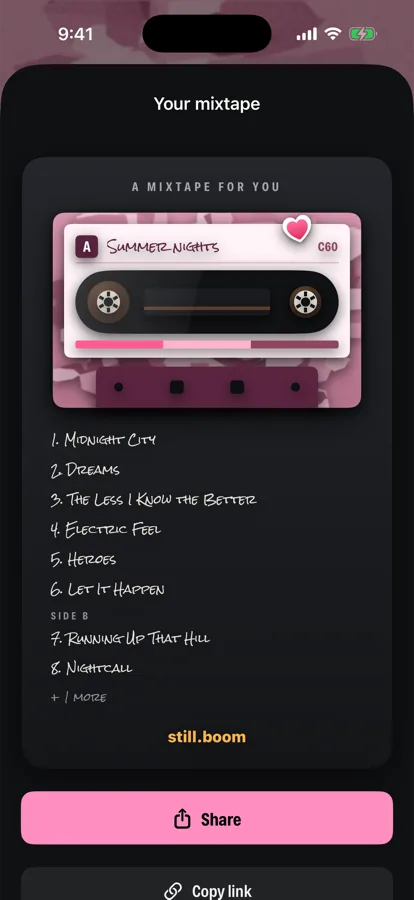
Share sends the card, Copy link just the link -
Check the link
The link is printed under the buttons. still.boom swaps it for a short one, stillboom.com/m/…, as soon as it's online. Without a connection you get a longer link; it works just the same.
-
Tap Share
The iPhone share menu opens with two things in it: a picture of the card (your cassette, the title and the track list in handwriting) and a message:
I made you a mixtape: “Summer nights”, 8 songs. Play it on still.boom stillboom.com/m/…
Pick any app from the menu: Messages, Mail, a chat app. The picture shows what the tape looks like, and the link plays it.
-
Or tap Copy link
The button turns into Link copied. Paste the link wherever you want: a DM, an email, a note in a gift box with a QR code you made yourself.
What the other person sees
If they have still.boom
The link opens still.boom. It asks for Apple Music access if it doesn't have it yet, finds your songs in Apple Music, puts the cassette in the deck and starts playing side A. The mixtape stays in their library on the MIXTAPES shelf, so they can play it again later.
It arrives in your design: if you recorded on Pink Camo, they get a Pink Camo cassette, even if they don't own that body.
If they don't have the app yet
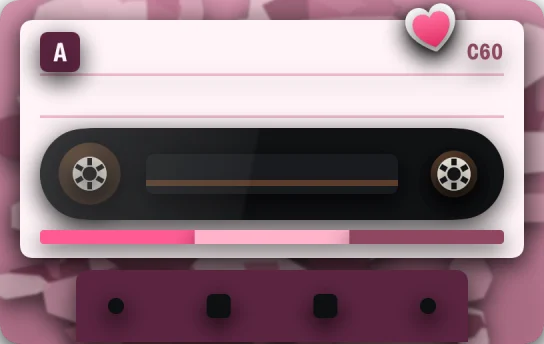
The link opens a page on stillboom.com that says Someone made you a mixtape. It shows your cassette with the title and your note in handwriting, how many songs are on it and which tape (C46, C60 or C90), and a Play in still.boom button.
What they need to play it
- An iPhone with still.boom (iOS 17 or later).
- An Apple Music subscription. The mixtape holds Apple Music songs, and still.boom plays them from Apple Music. It doesn't play on Spotify or YouTube Music.
What's inside the link
Only what's on the tape: the title, the note, the cassette design, the tape length and the list of Apple Music song IDs. No name, no account, nothing about you. Anyone who has the link can open the mixtape, so send it to the person it's for. Privacy policy.
Questions
Does a mixtape link expire?
No. The link keeps working; there's no expiry date on it.
I changed the songs. Does the link I sent change too?
No. A changed mixtape gets a new link. The one you already sent keeps playing the old version, so send the new link if you want them to hear the new one.
Can I send a mixtape to someone on Android or Spotify?
They can open the link and see the cassette page, but to play it they need still.boom on an iPhone and Apple Music.
Can I send it in Instagram?
Yes: copy the link and paste it into a DM. To post what you're listening to in a Story or Reel with the song playing, see this guide.
Is it a real cassette?
No, it's digital: a cassette on the screen that plays like one, with sides and a flip. Nothing is posted by mail.